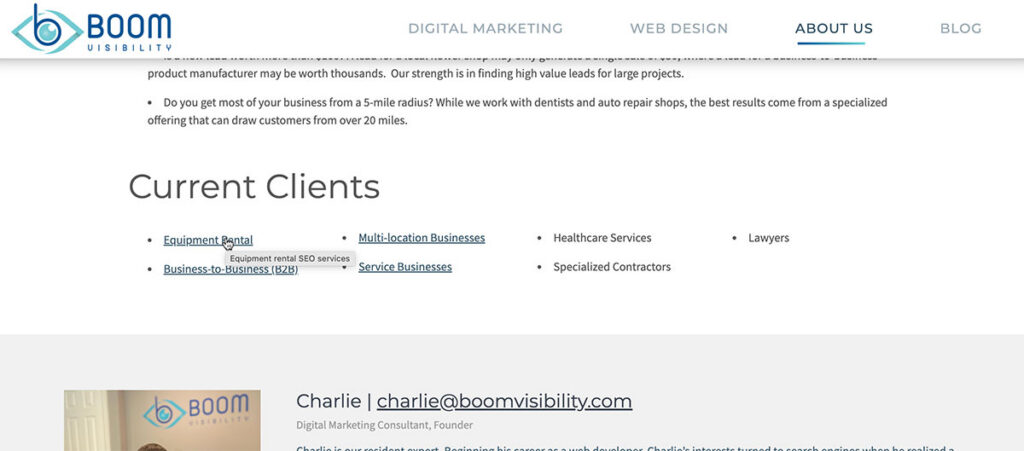
 Most website owners spend time optimizing page title tags, meta descriptions, and headings. But there’s another HTML attribute that often causes confusion: the title attribute on hyperlinks. Some SEO plugins even encourage adding them automatically, while others recommend ignoring them altogether.
So are title attributes on links important? The short answer is: not nearly as much as many people think.
While hyperlink title attributes can occasionally improve usability in specific situations, they provide little to no direct SEO benefit and should never replace descriptive anchor text. Google’s ranking systems rely much more heavily on the actual content of your page and the visible anchor text within links than on hidden title attributes.
What Is a Link Title Attribute?
A hyperlink title attribute is additional text added to an HTML link.
For example:
<a href=”/seo-services/” title=”Learn more about our SEO services”>SEO Services</a>
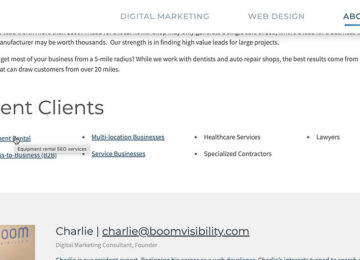
When supported by a browser, users may see this text as a small tooltip when hovering over the link with a mouse. Many people confuse this with the page’s <title> tag, but they’re completely different elements.
| Page Title Tag | Link Title Attribute |
|---|---|
| Appears in browser tabs | Appears as a tooltip on hover |
| Used by search engines | Primarily intended for additional user information |
| Important SEO element | Minimal SEO value |
| One per page | Can be added to any link |
Do Link Title Attributes Help SEO?
Not in any meaningful way.
Google has repeatedly emphasized the importance of writing descriptive content and useful anchor text rather than relying on additional HTML attributes. Modern search algorithms determine what a page is about through its content, headings, structured data, and visible links—not by tooltip text attached to hyperlinks.
If you’re trying to improve rankings, your time is much better spent optimizing:
- Page titles
- H1 headings
- Internal linking
- Helpful content
- Descriptive anchor text
Adding title attributes to every link isn’t likely to move the needle.
The Real Purpose of Link Title Attributes
Where title attributes can provide value is in user experience. They can offer a little extra context before someone clicks.
For example, instead of:
Download
a title attribute might display:
Download our 2026 SEO Checklist (PDF)
This can help clarify exactly what users are about to open.
However, if your anchor text already says:
Download Our 2026 SEO Checklist (PDF)
then the title attribute becomes redundant.
Are Link Title Attributes Good for Accessibility?
This is where many myths originate. Years ago, some developers believed title attributes improved accessibility for screen readers.
Today, accessibility experts generally recommend not relying on title attributes because many assistive technologies either ignore them, handle them inconsistently, or make them inaccessible for keyboard and touch users. Instead, descriptive link text provides a much better experience. WCAG emphasizes making the purpose of pages and links clear through meaningful text rather than hidden hover content.
For example:
❌ Click Here
Better:
✓ View Our SEO Audit Checklist
The second example is more helpful for every user, not just those using assistive technology.
Anchor Text Matters Much More
If you’re deciding between spending time writing better anchor text or adding title attributes, always improve the anchor text first. Good anchor text tells both users and search engines what they’ll find after clicking.
Examples include:
- Local SEO Services
- Commercial Roofing Guide
- Request a Free Estimate
- Compare HVAC Systems
Avoid vague phrases like:
- Click Here
- Learn More
- Read This
- More
Strong anchor text naturally improves usability while helping search engines understand the relationship between pages.
When Should You Use Link Title Attributes?
Although they aren’t necessary for every link, they can still be useful in some situations.
1. Identical Anchor Text
If several links use the same visible text but lead to different destinations, a title attribute can provide additional clarification.
2. File Downloads
If a link downloads a PDF, spreadsheet, or other file, the title attribute can indicate what users should expect.
Example:
Download Warranty Guide
Title attribute:
Download our 15-page Product Warranty Guide (PDF)
3. Icons Without Much Context
Icon-based navigation occasionally benefits from additional descriptive information. Even then, accessibility labels are usually preferred over title attributes.
When You Can Skip Them
For most websites, title attributes simply aren’t necessary.
Skip them when:
- Your anchor text already explains the destination.
- You’re adding them only for SEO.
- You’re automatically generating them for every link.
- They duplicate the anchor text word-for-word.
In these cases, they provide little additional value.
Best Practices
 If you decide to use title attributes, follow a few simple guidelines:
- Keep them short and descriptive.
- Don’t duplicate the anchor text unless necessary.
- Focus on adding useful context.
- Don’t keyword stuff.
- Never rely on them instead of writing clear anchor text.
Remember that the goal is to help users, not search engines.
Don’t Spend Too Much Time Worrying About Title Attributes!
Hyperlink title attributes aren’t harmful, but they also aren’t the hidden SEO tactic some people believe them to be.
If you’re looking for the biggest SEO wins, invest your time in creating helpful content, writing descriptive page titles, improving internal linking, and using meaningful anchor text. Those efforts have a far greater impact on both search visibility and user experience.
Title attributes can still be useful in specific situations—such as clarifying downloads or adding context to icon-only links—but for the vast majority of links, they’re simply optional.













this is extremely important in SEO, whoever told you that was incorrect. This is called anchor text and it helps tell the search engine the type of content located at that location.
This is not called anchor text. The title tag is different. I know that anchor text is very important in SEO.